
Hospital telemedicine equipment planning should connect virtual clinical services with consultation workflows, digital infrastructure and technical support. Purchasing cameras and screens without defining the complete service can create compatibility, privacy and reliability problems.
For healthcare buyer teams sourcing telemedicine equipment, the first step is to document how consultations will operate. The plan should identify users, locations, expected demand, connected clinical devices and support responsibilities.
Clinical departments, digital teams, biomedical engineers, facilities personnel and procurement managers may hold different parts of this information. Their requirements should be combined into a single approved equipment and implementation schedule.
A controlled plan helps hospitals compare complete systems, prepare consultation areas and maintain reliable telemedicine services after implementation.
Define the Virtual-Care Service Requirements
Equipment should be selected according to the approved service model rather than a general video-calling requirement.
Clinical services — Identify the departments, consultation types and approved remote-care workflows the hospital intends to support.
Consultation locations — Record whether equipment will be installed in dedicated rooms, wards, emergency areas, outpatient spaces or mobile stations.
Remote participants — Define whether consultations will connect hospital clinicians, external specialists, other healthcare facilities or approved patient locations.
Expected demand — Estimate consultation numbers, session duration, peak usage periods and anticipated growth.
Operating hours — Confirm routine schedules, urgent access requirements and technical-support availability.
Clinical peripherals — Identify any approved examination cameras, digital devices or remote-assessment tools required for each service.
Staff responsibilities — Record who prepares the room, supports the patient, begins the session and reports technical faults.
Continuity arrangements — Define the approved alternative when equipment, software or network access is unavailable.
In practice, healthcare buyers often find that the communication platform is selected before the clinical workflow has been documented.
The service requirements should therefore be approved before specific products are shortlisted.
Match Equipment to Hospital Locations
Different hospital environments may require fixed, mobile or shared telemedicine configurations.
Dedicated consultation rooms — These spaces may use permanently installed cameras, microphones, displays and clinician workstations.
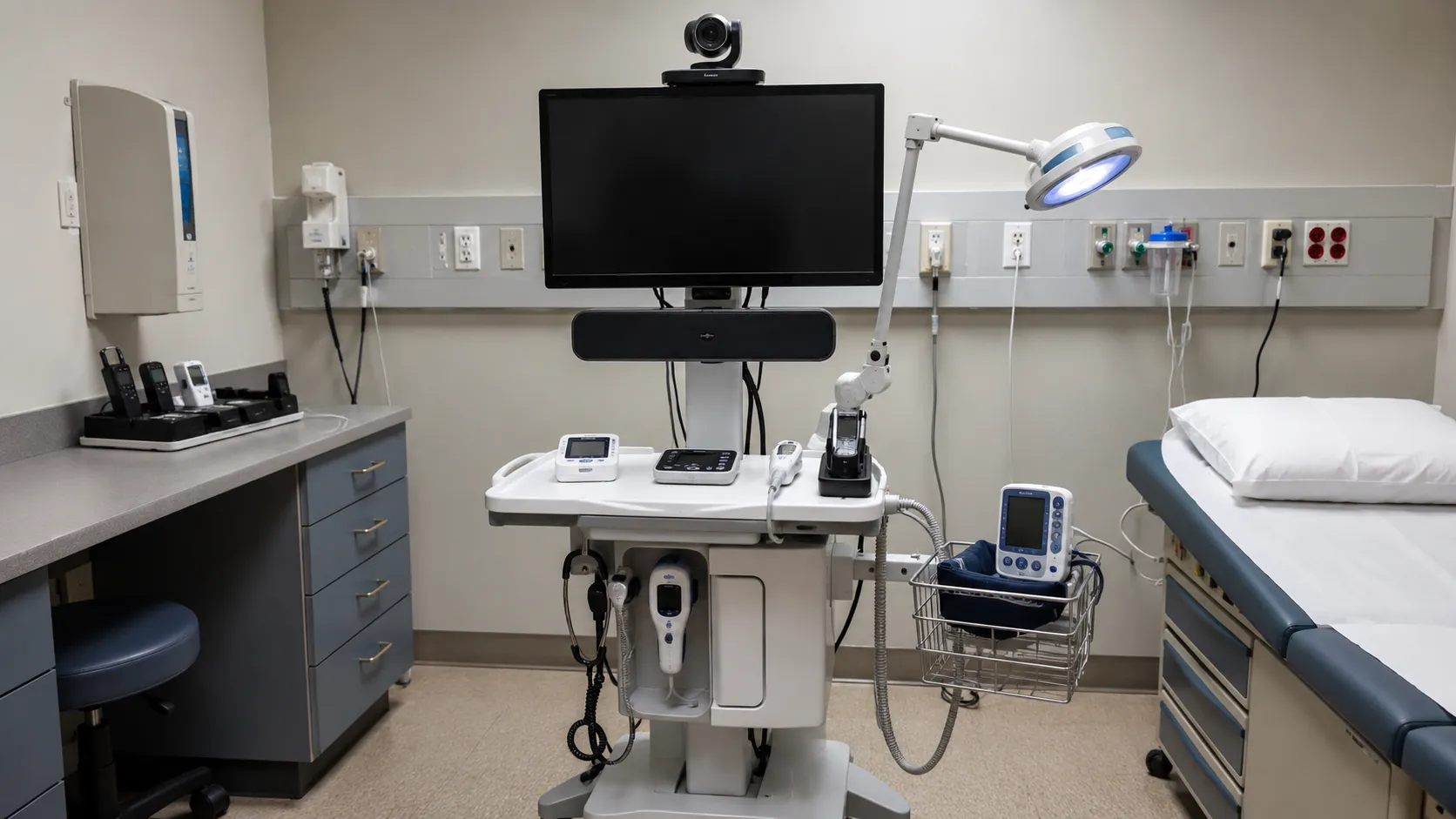
Mobile telemedicine carts — Mobile systems may combine a computer, camera, display, battery, speakers and connected clinical peripherals.
Hospitals comparing specialist medical equipment supply networks should confirm that proposed systems suit the intended software, network environment and consultation workflow.
Ward-based stations — Shared ward equipment requires clear arrangements for charging, cleaning, booking, and storage.
Emergency-service systems — Equipment should be positioned for rapid access and supported by dependable network coverage.
Specialist clinical systems — Some services may require higher-resolution cameras, examination devices or image-sharing capabilities.
Clinician workstations — Remote specialists may need suitable displays, audio equipment, cameras and access to hospital systems.
Patient-side stations — Equipment positioning should support clear communication and any approved remote assessment.
Equipment storage — Carts, chargers, cables, and clinical peripherals need secure, identifiable storage locations.
Experienced digital-health managers typically maintain a standard core system and add approved specialist peripherals only where the clinical workflow requires them.
Set Hardware, Software and Network Standards
Telemedicine equipment should be reviewed as one connected system rather than as separate products.
Camera performance — Define image resolution, movement, zoom, field of view and low-light requirements.
Audio performance — Confirm microphone range, speaker clarity, echo control and room-noise considerations.
Display requirements — Review screen size, resolution, positioning, mounting and visibility for intended users.
Computer specification — Confirm processor, memory, ports, operating system and device-management requirements.
Network capacity — Assess connection availability, coverage, stability and support across all intended locations.
Platform compatibility — Verify that hardware, operating systems, software and hospital applications can function together.
Peripheral compatibility — Confirm that approved clinical cameras and diagnostic devices can connect to the proposed system.
Account controls — Define user authentication, permissions, account ownership and access removal procedures.
Cybersecurity requirements — Review software updates, encryption, endpoint management and technical responsibilities.
Power arrangements — Confirm sockets, protected power, charging points, and mobile system battery duration.
Documentation requirements — Request the current manuals, configuration details, and applicable compliance records for each specific product.
Acceptance testing — Define video, audio, software, security and connection checks before operational release.
One aspect that surprises first-time buyers is that a system may work during a supplier demonstration but perform differently on the hospital’s network.
The complete configuration should be tested in its intended operating location before final acceptance.
Evaluate Suppliers and Commercial Proposals
Supplier comparisons should cover the full telemedicine package, including recurring services and technical support.
Supplier experience — Assess experience with healthcare communication systems, connected devices, integration and implementation.
Quotation format — Require separate details for hardware, peripherals, software, licences, installation and optional products.
Accuracy of supplier claims — Medical equipment companies advertising telemedicine solutions to healthcare buyers should ensure that performance, compatibility and support information match their formal proposal.
Exact configuration — Record the manufacturer, model, software version, accessories and included interfaces.
Equipment condition — State whether products are new, refurbished, demonstration or another approved condition.
Complete acquisition cost — Include hardware, delivery, mounting, configuration, integration, training and initial support.
Recurring costs — Identify software subscriptions, cloud storage, licences, updates and ongoing support charges.
Infrastructure exclusions — Clarify responsibility for network improvements, power, room preparation and fixed mounting.
Warranty coverage — Review hardware, accessories, batteries, labour, replacement and commercial exclusions.
Implementation scope — Confirm who will install, configure, integrate, test and document the system.
Training commitment — Record user groups, session numbers, trainers and included materials.
Support arrangements — Review remote assistance, response targets, replacement equipment and escalation routes.
Healthcare organisations developing broader virtual-care programmes may benefit from collaborative international medical equipment supply partnerships.
Each telemedicine purchase should still identify its exact hardware, licences, accessories, subscriptions and implementation responsibilities.
Coordinate Installation and Operational Handover
Equipment should be installed through a controlled process that covers rooms, software, connectivity, and staff readiness.
Delivery inspection — Verify manufacturers, models, quantities, serial numbers, accessories and visible condition.
Room preparation — Check lighting, acoustics, privacy, furniture, power, network points and equipment positioning.
System installation — Coordinate suppliers, digital teams, biomedical engineers, facilities personnel and clinical representatives.
Software configuration — Set up approved applications, accounts, permissions, interfaces and update arrangements.
Network testing — Test video, audio and connected peripherals under realistic operating conditions.
Workflow simulation — Complete trial consultations using the intended rooms, staff roles and remote locations.
Asset registration — Record the manufacturer, model, serial number, location, warranty and support details.
User training — Provide role-based instruction covering operation, connection checks, privacy and fault escalation.
Technical training — Digital and biomedical teams may need separate instruction on configuration and maintenance.
Cleaning arrangements — Define responsibilities for shared carts, displays, cameras, microphones and clinical peripherals.
Maintenance schedule — Plan inspections, battery checks, software reviews and technical servicing.
Handover approval — Release the system only after outstanding technical, operational and training actions are completed.
Physical delivery should not be treated as confirmation that a telemedicine service is ready to operate.
Monitor Performance and Approve Future Changes
Hospitals should use operational evidence to improve equipment and support arrangements.
Service utilisation — Compare planned equipment capacity with actual consultation activity.
Connection reliability — Record interrupted sessions, audio failures, image problems and recurring network limitations.
Equipment downtime — Track hardware faults, battery failures, missing accessories and service restrictions.
Software performance — Review updates, compatibility issues, licences and platform availability.
User feedback — Collect structured comments from clinical users, support personnel and technical teams.
Supplier performance — Monitor implementation quality, response times, replacement support and documentation.
Security review — Confirm that software, accounts and connected devices remain within approved hospital controls.
Asset-location review — Track mobile carts and shared equipment across departments.
Replacement planning — Use condition, utilisation, software support and compatibility to prioritise future investment.
Change control — Require written review for new peripherals, substituted models, platform changes or relocated systems.
Healthcare organisations seeking telemedicine equipment packages, quotations or international sourcing assistance can contact the Medigear.uk sourcing and export team. Enquiries should include the planned services, consultation locations, equipment quantities, software requirements and destination.
The telemedicine equipment plan should remain active as hospital workflows, clinical services and digital platforms change.
Final thoughts
Telemedicine equipment planning should begin with an approved virtual-care service model and clearly documented consultation workflow.
Healthcare teams should coordinate cameras, microphones, displays, computers, mobile carts, clinical peripherals, and network infrastructure into a single, integrated system. Privacy, software, security, and technical support requirements should be included from the beginning.
Supplier quotations should separate hardware, licences, subscriptions, implementation services and exclusions.
A structured plan helps hospitals build dependable telemedicine services that can be supported, expanded and evaluated over time.
Disclaimer
Medigear.uk is a global medical equipment supplier, exporter, and distributor. The content published on this site is intended for educational and product awareness purposes only. Nothing on this page constitutes medical advice, clinical guidance, or treatment recommendations. All healthcare procurement and clinical decisions should be made by qualified medical professionals and compliant procurement teams operating within the regulatory frameworks of their respective countries.